How to Choose a Zero Gravity Chair for Office Work
A zero gravity chair for office work suits reading, calls, and short computer sessions when you can reach your desk comfortably and leave room to recline. Check the chair's dimensions, intended setting, weight capacity, and fit with your workstation before you buy.
On this page (7 sections)
- What does a zero gravity chair for office work need?
- How can you check desk reach and posture?
- How much room does a zero gravity chair need?
- Which chair style fits your work routine?
- How do you choose a zero gravity chair for office use?
- How should you set up and care for a zero gravity chair?
- Which zero gravity chair should you choose for your office?
A zero gravity chair for office work suits reading, calls, and short computer sessions when you can reach your desk comfortably and leave room to recline. Before buying, match the chair's shape and movement to your desk, screen, and everyday work.
Many chairs in this style are made for outdoor lounging. Their seat height, recline, and arm position may not work at a regular desk.
Think of the chair and workstation as one setup: if using a keyboard makes you lean forward, it is a poor fit for that task.
What does a zero gravity chair for office work need?
A zero gravity chair for office work needs a stable working position where you can see the screen and use your input devices without reaching. The reclined position can be useful for reading or calls, but typing usually calls for a more upright posture.
The term describes a reclined seating position. It does not promise ergonomic support or make every chair suitable for desk work.
Read how a zero gravity recliner works and what a zero gravity recliner is to understand the style before comparing models.
For typing, check that your back is supported and your hands can reach the keyboard and mouse without lifting your shoulders. Your feet should rest comfortably, and you should be able to look at the screen without bending your neck forward or tilting your head back.
A chair that lets you sit upright and recline for breaks can handle more kinds of work than a deep lounge position alone. If most of your day involves a keyboard, compare reclining office chairs designed around desk use before deciding that a patio lounger can replace your desk chair.
Is a zero gravity chair for office typing a good fit?
It can be, for short typing sessions, if your hands stay within easy reach and your screen stays at a comfortable viewing height. For long sessions, a chair that leaves you reaching or leaning will make the workstation harder to use.
Set your keyboard and mouse where your elbows can stay close to your sides. If the chair's arms stop you from getting near the desk, or the seat puts you too low to type comfortably, you would need to change the workstation or choose another chair.
How can you check desk reach and posture?
Set up the desk first, then check whether the chair lets you use it comfortably. Your hands should reach the keyboard and mouse without your torso moving toward the desk.
Use the setup you actually expect to work with. Sit upright and place your feet comfortably.
Check the screen from that position, then recline slightly and see whether you can still view the display without pulling your head forward.
Pay attention to what happens when you change position. A monitor arm or keyboard tray may help you adjust the equipment, but only if it gives you a steady working position rather than forcing you to reposition everything every time you sit down.
If you want foot support while working, consider a chair made for a desk. Our guide to reclining desk chairs with footrests can help you compare options for keeping your feet supported without relying on a separate lounge chair.
What should you adjust before you work?
Adjust the chair, screen, keyboard, and mouse as a set. Start with the position you will use most, then make sure you can get to the other positions without knocking into furniture or stretching for controls.
Keep power cords and accessories out of the chair's moving path. Set a drink, phone, and other items where you can reach them without twisting sharply or leaning across the desk.
How much room does a zero gravity chair need?
Measure the chair upright and fully reclined, then make sure you have a clear route to sit down and get up. The reclined footprint may extend into a walkway or meet the desk even when the chair fits in its upright position.
Measure the floor space where the chair will sit. Include clearance from walls and furniture, access to controls, and room for your legs.
Count nearby equipment and any separate footrest or ottoman too.
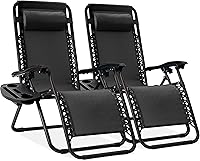
The Best Choice Products Zero Gravity Chairs Recliner opens to a length of 32.5–61 in and folds to 38 x 25 x 6 in. It has a lockable reclining system, a removable tray with cup, phone, and tablet holders, and a removable adjustable headrest.
This set is designed for outdoor use, so it is a better match for a patio or a separate lounge area than a regular all-day workstation. Its stated weight capacity is 250 lb, and its flexible textilene fabric, steel frame, and adjustable elastic cords suit a portable lounging role.
Before placing it beside a desk, check whether you can get close enough to type and whether the tray gets in the way. A removable tray can keep small items within reach, but it does not replace a suitable work surface for a keyboard and mouse.
What measurements should you take first?
Measure the available floor area, the desk height, and the distance from your seat to the screen. Compare them with the chair's upright and open dimensions, not only its folded size.
Leave room for the chair to move between positions and for you to enter and exit. Check doorways and storage space too if you plan to fold the chair away after work.
Which chair style fits your work routine?
Choose the chair style that matches your most frequent task. A task-focused recliner is more likely to fit desk work, while a lounge chair is a stronger choice for breaks and relaxed reading.
A fully reclining chair may be useful when you want to stretch out away from the keyboard. Compare fully reclining office chairs if the ability to recline is a priority, and consider whether you can still sit upright when work calls for typing.
A gaming recliner may suit a room that serves both work and entertainment. Our guide to gaming recliner chairs for adults covers that style, while a standard task chair remains the simpler choice for long keyboard sessions.
The Storkcraft Premium Hoop Glider & Ottoman is better suited to reading breaks than desk work. It has a smooth-gliding solid wood frame, padded arms with side pockets, and a separate ottoman, so plan space for both pieces.
This chair's seat is 17.32 in wide and 18.7 in deep, with a 17.5 in seat height. Those dimensions help you plan its place in a room, but the gliding base and separate ottoman do not make it a practical typing chair.
For a side-by-side explanation, read glider vs recliner differences.
If you want one seat for several tasks, decide which task matters most. A chair that works for calls and breaks may still be a poor substitute for a desk chair during a full workday.
Should you use a zero gravity chair all day?
Use a lounge-style zero gravity chair for breaks or selected tasks if you can maintain a comfortable setup. For a full day of typing, choose seating that keeps your screen and input devices aligned without frequent workarounds.
Change positions and take regular movement breaks. If a setup makes you crane your neck, reach repeatedly, or struggle to get in and out, adjust it or choose a different chair for that work.
How do you choose a zero gravity chair for office use?
Choose by checking fit, task, room, and intended setting in that order. A chair can have useful reclining features and still be the wrong choice for your desk.
Use this checklist before you buy:
- Measure the full recline footprint. Include any ottoman or footrest and leave room for entry and exit.
- Check seat height against the desk. Make sure you can sit close enough to reach the keyboard.
- Check screen and input reach. You should not have to lean forward to type or crane your neck to see.
- Review recline controls. Pick an adjustment method you can use safely in the space you have.
- Match weight capacity to your needs. The Best Choice Products chair has a stated 250 lb capacity.
- Check the intended setting. An outdoor lounger may not fit an indoor office routine.
- Plan cables and walkways. Keep cords away from moving parts and walking paths.
- Consider how often you type. Frequent typing calls for an upright position that feels easy to maintain.
A separate side table can hold items you want within reach, but it will not solve a desk that is too far away. Measure the table height and distance too, and see our guide to choosing between an ottoman and coffee table if you need a surface beside the chair.
Who should buy each chair style?
Buy the Best Choice Products pair if you want foldable outdoor loungers for breaks and have room to use them away from your main desk. Skip them as your primary office chairs if you need indoor task seating for hours of typing or if the 250 lb capacity does not suit your needs.
Choose the Storkcraft glider and ottoman if your main use is reading or taking a quiet break and you have room for both pieces. For a glider that also reclines, see the Babyletto Kiwi glider recliner review.
Skip it if you need a compact chair that tucks neatly under a desk or if you want an upright typing position.
Choose a task-focused reclining office chair if you spend much of the day working at a screen and want the chair built around desk reach. Skip a lounge-first chair if it forces you to keep adjusting the monitor and keyboard to make basic work possible.
How should you set up and care for a zero gravity chair?
Set up the chair on a level surface and follow its assembly and adjustment instructions. Keep the area around its frame clear before reclining or folding it.
For the Best Choice Products chair, use the lockable recline system as intended and check that the chair is stable before you sit down. The removable tray and headrest can be taken off when they are in the way, and the chair folds for storage or transport.
Keep fabric clean according to the care instructions for the chair you choose. Avoid storing a folding chair while it is damp, and check moving parts and cords periodically for wear or anything that prevents smooth movement.
For the Storkcraft glider, assemble the chair and ottoman as instructed and keep both pieces on a stable floor. The set requires assembly, so check that all parts are secure before regular use.
What common buying mistakes should you avoid?
The most common mistake is choosing by recline alone. A deep recline can feel appealing for breaks while putting the keyboard too far away for work.
Other mistakes include measuring only the upright footprint, overlooking the desk height, ignoring the weight capacity, and assuming an outdoor chair will suit an indoor office. Check the whole setup before ordering, including walking paths and where a folded chair will be stored.
Do not treat a removable tray as a workstation. It can hold small personal items, but your keyboard and mouse need a stable position that supports comfortable reach.
Which zero gravity chair should you choose for your office?
Choose a zero gravity chair for office use when you can sit upright, reach the screen and controls, and leave room for the full recline. Choose a desk recliner or task chair if you type often or would have to lean forward to reach your equipment.
Pick the Best Choice Products chair for outdoor lounging and occasional breaks, and pick the Storkcraft glider for reading when you have space for an ottoman. If you want to compare lounge-first options, browse our best zero gravity recliner chair options and check each chair's footprint against your room before deciding.
Frequently asked questions
Can you use a zero gravity chair as an office chair?
You can use one for some desk tasks if the chair, desk, and screen stay aligned through the positions you use. Check whether you can reach the keyboard and mouse without leaning, and whether the chair fits under or beside the desk.
A patio recliner may work better for breaks than continuous computer work.
How much space does a zero gravity chair need?
Allow for the chair's full recline length, its movement, and room to get in and out. Measure the intended position at upright and reclined angles, then add space for a desk, footrest, cables, and walking path.
Follow the chair's instructions for placement and clearance.
Is a zero gravity chair good for posture?
A reclined position can feel comfortable, but it does not guarantee good posture during desk work. Keep your screen in view, support your back, and place the keyboard and mouse within easy reach.
If you must crane your neck or stretch your arms, adjust the workstation or choose another chair.
What should I check before buying a zero gravity work chair?
Check the chair's upright and reclined dimensions, weight capacity, adjustment method, and whether it is designed for indoor use. Compare those details with your desk height, screen position, and available floor space.
Also consider how you'll sit upright for typing and get out of the chair safely.
Can I work all day in a recliner?
A recliner may suit short tasks and breaks, but all-day desk work depends on whether it supports a workable typing posture and lets you adjust positions comfortably. Set up the screen and input devices to avoid reaching or bending, and take regular movement breaks.
Ask a health professional about persistent discomfort.